i
Net result after fees
The headline number counts trading fees, rebates and rewards, the way Polymarket computes it. Next to it: win rate, profit factor, average win and average loss.

A trader journal for any Polymarket wallet. Paste an address, a profile link or an @username and get the result after fees, the categories that pay, how your entry prices compare with reality and what early exits cost you.
Install it on a computer: phone browsers can't load this extension.
FreeNo wallet access5 languages
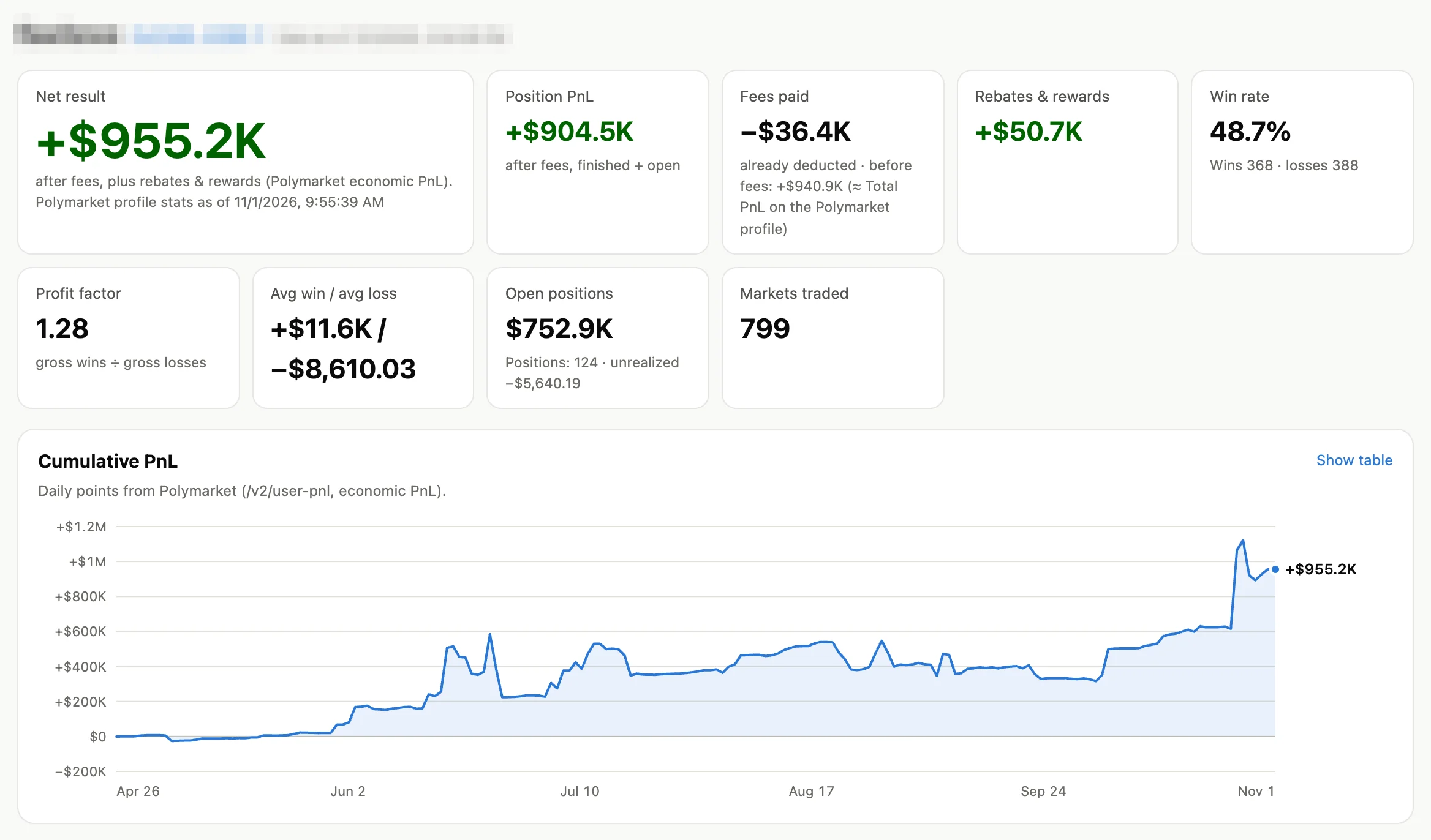
Real journal of a public wallet. We blurred the name.
What you get
Polymarket shows your total. The journal breaks it down, so you can see which trades make money and which habits lose it.
i
The headline number counts trading fees, rebates and rewards, the way Polymarket computes it. Next to it: win rate, profit factor, average win and average loss.
ii
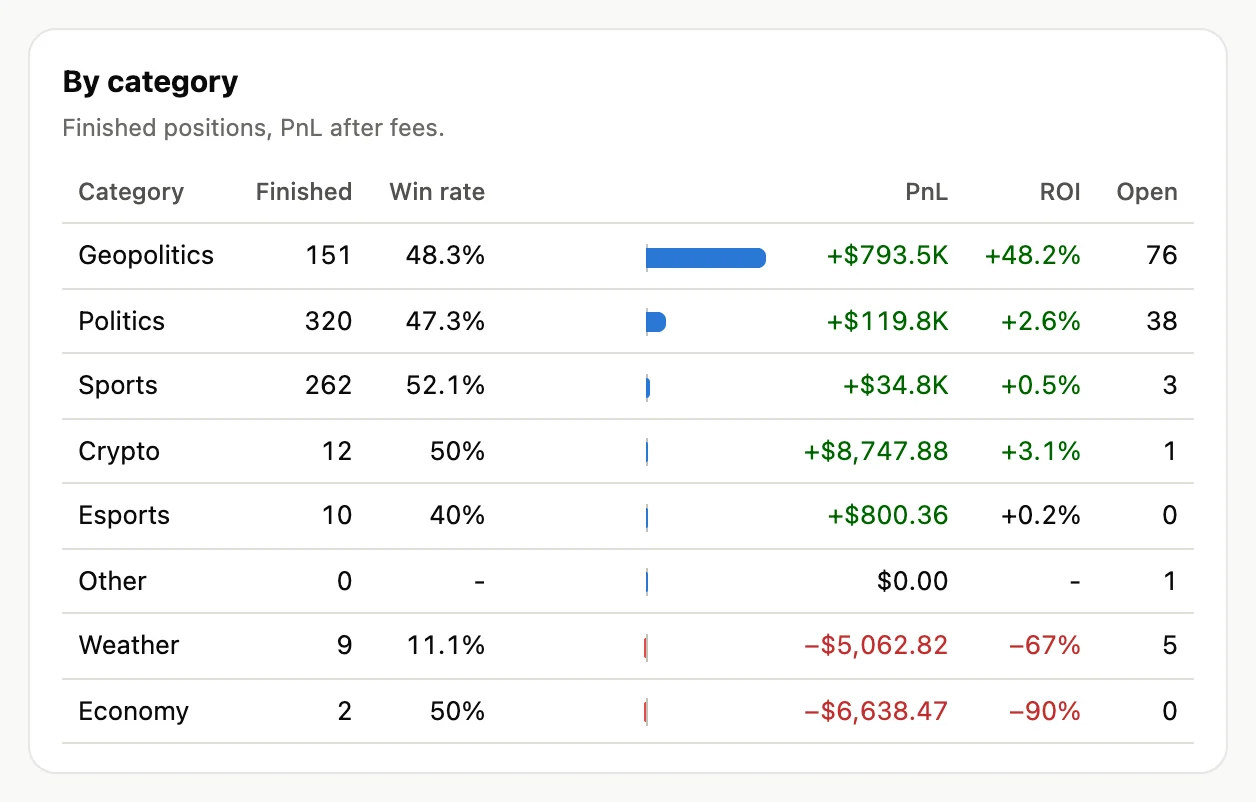
Politics, sports, crypto, esports and more: positions, win rate, PnL and ROI in each. You see where your edge is and where money leaks.
iii
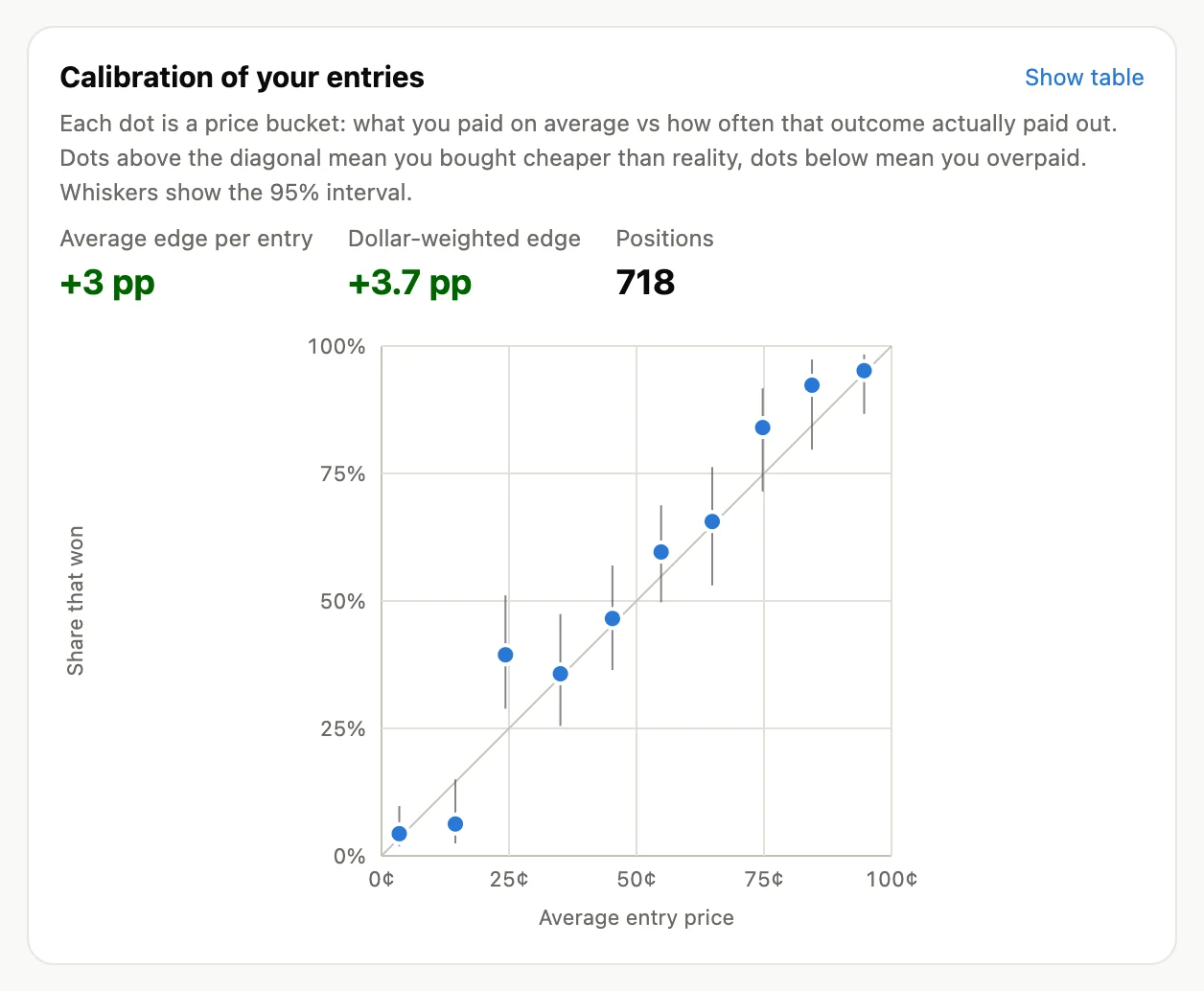
For every price range: what you paid on average and how often that outcome actually won. Above the line you bought cheap, below it you overpaid.
iv
Positions held to resolution against those sold early, and how much the early exits saved or cost compared with holding.
v
A cumulative PnL chart, month by month results, holding time of winners and losers, longshots against favourites.
vi
Export positions, monthly results and the full activity ledger for a year or all time: trades, redemptions, rewards, deposits and withdrawals.
Open it from the toolbar button, or click Journal for this trader on any Polymarket profile page. Recent wallets stay in the list for one click access.
Numbers you can check
The journal reads the same positions, activity and profile stats that Polymarket publishes. Every figure says where it comes from, and the result before fees lines up with the Total PnL on the profile.
By category
Calibration of entries
Private by design
All the math happens on your computer. There are no PolyTools servers in the loop.
It reads Polymarket's public market data. No API keys, no login, no wallet connection.
It has no access to your funds and can't place, change or cancel orders.
No analytics, no tracking, no accounts. Settings and cached data are kept by your browser and never sent to us.
The code is plain, readable JavaScript, and every permission is listed on the extension card. Read the privacy policy
Install
The extension is not in the Chrome Web Store yet, so you add it by hand. Five steps, and it works in Chrome, Edge, Brave, Opera and other Chromium browsers on a computer.
polytools-journal-0.1.0chrome://extensionsIn Edge the address is edge://extensions, in Brave brave://extensions, in Opera opera://extensions.
Keep the folder: Chrome loads the extension from it at every start, and deleting the folder removes the extension. Documents is a better home for it than Downloads.
On Windows, Extract All can put the folder inside another folder with the same name. In step 4, pick the inner one, the folder with manifest.json in it.
Chrome may remind you that developer mode extensions are on. That is normal for extensions installed by hand.
To update, download the new version, replace the folder and press the reload arrow on the extension card.
Firefox and store versions are not out yet. We announce new versions on X first.
Questions
Yes. Both PolyTools extensions are free, with no paid tier and no ads.
You install exactly the code in the folder. It is plain, unminified JavaScript that anyone can read, and the extension card in your browser lists every permission. It can read polymarket.com and Polymarket's public data, and nothing else.
Yes. Trading data on Polymarket is public, so the journal works for any wallet: yours, a trader you follow or a whale you want to study.
The profile shows the result before fees. The journal shows it after fees and adds rebates and rewards. The fees tile shows both numbers, so you can compare.
It is raw data in UTC for you or your accountant, and it is not tax advice. Polymarket computes PnL with average cost, and your local rules may differ.
Polymarket is unavailable in some countries. Check the official list and your local laws before you trade.

See the real cost of your next trade before you place it: average fill, fee, payout and break-even, right under the Polymarket ticket.